Tuesday, July 23, 2013

Thursday, July 18, 2013
Tuesday, July 16, 2013
Wednesday, August 17, 2011
Change Environment Variables through Command Prompt
You can use the DOS Set command to change the Environment variables through Command Prompt.
If you wish to make the changes permanent use SetX command.
e.g. SETX ENV DEV
This will change the Enviornment Variable "ENV" to "DEV".
Tuesday, March 29, 2011
Delete logical duplicates using Ranking Function
A simple way to delete duplicate (not absolute duplicate records where records are completely identical) records from table using the ranking function and CTE is as follows.
The following SQL will remove logical duplicate records from the table tblTransaction.
If the table tblTransaction has multiple records for a combination of AccountId and RecordId the DELETE syntax will keep only the latest dates and delete all previous records for the combination.
WITH Transaction_CTE (Ranking, AccountId, RecordId, StartDate) AS (
SELECT Ranking = DENSE_RANK()
OVER(PARTITION BY AccountId, RecordId
ORDER BY StartDate ASC),
AccountId, RecordId, StartDate
FROM dbo.tblTransaction )
DELETE FROM Transaction_CTE WHERE Ranking > 1
Thursday, March 24, 2011
Pass NULL String in the Conditional Expression
I have a SSIS package that reads data from a flat file and loads it into database table. The flat file should send valid values for all columns. However, I got the file with "NULL" written for integer values. The requirement was to store NULL values in the database column.
Passing NULL in SSIS is not straight forward. The MSDN article recommends using the expression NULL(DT_STR,10,1252) to return NULL.
http://msdn.microsoft.com/en-us/library/ms141758.aspx
This did not work for me. After some work, I figured that you have to again cast the NULL return value to string to make it work.
(DT_STR,10,1252)NULL(DT_STR,10,1252)
If you want to use this in Conditional expression, you can use the following format.
Pts_Earned == "NULL" ? (DT_STR,10,1252)NULL(DT_STR,10,1252) : Pts_Earned
The above expression means if it finds "NULL" string in the column Pts_Earned it will pass on NULL or else passes on the actual value.
Hope this helps.
Passing NULL in SSIS is not straight forward. The MSDN article recommends using the expression NULL(DT_STR,10,1252) to return NULL.
http://msdn.microsoft.com/en-us/library/ms141758.aspx
This did not work for me. After some work, I figured that you have to again cast the NULL return value to string to make it work.
(DT_STR,10,1252)NULL(DT_STR,10,1252)
If you want to use this in Conditional expression, you can use the following format.
Pts_Earned == "NULL" ? (DT_STR,10,1252)NULL(DT_STR,10,1252) : Pts_Earned
The above expression means if it finds "NULL" string in the column Pts_Earned it will pass on NULL or else passes on the actual value.
Hope this helps.
Monday, January 10, 2011
New line in SSIS annotations
If you want a newline on your SSIS annotations, please hit Ctrl + Enter.
Monday, January 3, 2011
How it works : Analytics from IBMSocialMedia
IBM is investing a lot these days on Analytics.
The following video gives a very good overview of Analytics. Courtesy IBMSocialMedia.
Wednesday, December 22, 2010
Could not load file or assembly 'System.EnterpriseServices.Wrapper.dll
I have been struggling since a few days with the following issues on MS Analysis Services 2008. When I try and create a Data Source with the Provider "Native OLE DB\SQL Server Native Client 10.0" I was not able browse the list of databases. The list of databases always remained empty.
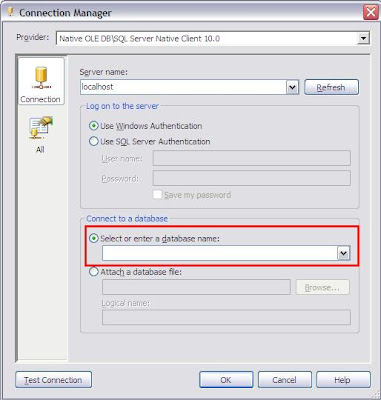
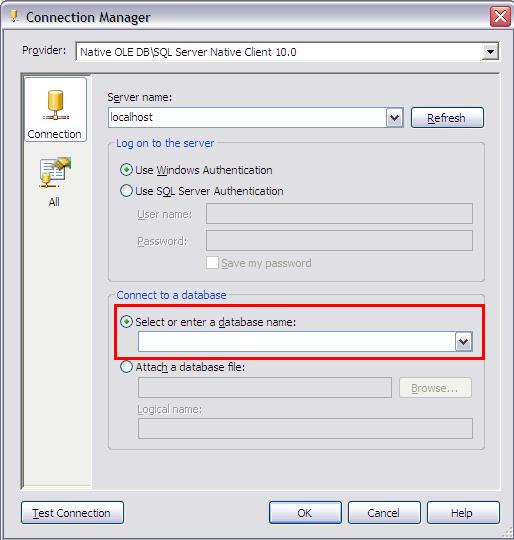
When I click on Test Connection I get the following error message "Test connection failed because of an error in initializing provider. Could not load file or assembly 'System.EnterpriseServices.Wrapper.dll' or one of its dependencies. The system cannot find the path specified".
After searching for the resolution on Internet, I found that I may have to reinstall my .Net Framework 2.0. Although, Windows will not allow me to remove my .Net Framework. It turned out that since I additionally had .Net Framework 3.0 and 3.5 installed, I had to remove them first before removing 2.0. And it worked..
After reinstalling .Net Framework 2.0 and all others I was able to browse the databases. Hope it helps...
Meanwhile, till the time I was not able to work with "Native OLE DB\SQL Server Native Client 10.0" I used ".Net Providers\SqlClient Data Provider"
Tuesday, December 21, 2010
Error "Unable to get the window handle for the 'ActionsAwarePivotTable' control."
I got the following error "Unable to get the window handle for the 'ActionsAwarePivotTable' control." while browsing the cube in SQL Server Analysis Services 2008.
It turns out that you get this error message when your Lotus Notes is up. The error went away after closing the Lotus Notes.
Wish there were better integration between IBM and Microsoft. :-)
Saturday, December 18, 2010
SQL Server 2008 Installation error for Reporting Services
If you get the following error while installing SQL Server 2008 "The Reporting Services catalog database file exists. Select a Reporting Services files-only mode installation.", please follow the link on Microsoft Support page. http://support.microsoft.com/kb/956095
To resolve this issue, move, rename, or delete the existing Report Server databases. Or, use a different instance name.
SQL Server 2008 Installation error for "Restart failed"
While trying to install SQL Server 2008 the installation may not proceed showing that Restart has failed. Even though you restart your computer it may show you the same message.
Check your system's pending file rename operations registry key. It should be cleared after you reboot your system. If not, something must be wrong.
HKEY_LOCAL_MACHINE\SYSTEM\CurrentControlSet\Control\Session Manager\PendingFileRenameOperations
Thursday, May 6, 2010
DMV a day by Glen Berry
Last month Glen Berry started a fantastic series called "DMV a day" and posted one DMV everyday.
This post has a compilation of all 30 DMV's.
This post has a compilation of all 30 DMV's.
Monday, January 18, 2010
Transfer Tables between Schemas
Sometimes we accidentally create table in our own user schema instead of dbo (or others). The following code translates between different schema.
Suppose there is a table called Employee which has been created in ragarwal schema instead of dbo. The following code will transfer it to dbo from ragarwal schema.
ALTER SCHEMA dbo
TRANSFER ragarwal.Employee
More on Alter Schema at the following MSDN Link.
Suppose there is a table called Employee which has been created in ragarwal schema instead of dbo. The following code will transfer it to dbo from ragarwal schema.
ALTER SCHEMA dbo
TRANSFER ragarwal.Employee
More on Alter Schema at the following MSDN Link.
Sunday, January 17, 2010
Record Resultset from Stored Procedure in a Table
There may be times when a Store Procedure outputs a Rowset and you may want to capture the results in a database table.
(The below example is executed on the AdventureWorks database)
Here is how you can do that. Suppose you have a Stored Procedure named LoadEmployee and it accepts the three parameters MaritalStatus, Gender and SalariedFlag and it outputs the resultset from the HumarResources.Employee table. Now, if you are interested in finding all salaried single ladies from the table and store it in EmployeeMaster table, this is how you do..
INSERT INTO dbo.EmployeeMasterAnd the output will be stored in a table.
EXEC dbo.LoadEmployee @MaritalStatus = 'S', @Gender = 'F', @SalariedFlag = 1
Monday, December 21, 2009
ANCESTOR MDX Function
I recently started looking up on MDX Functions and one of the first MDX Function I came across was ANCESTOR. Although, MSDN does provide some very good resource on MDX functions, but it was not so simple for me. Either I am totally new to MDX or I am too lame.
MSDN tries to explain the ANCESTOR MDX function using the Product Hierarchy on the Adventure Works Database but I think Date Hierarchy can be more cool.
So, here we go...
As the name suggests, the Ancestor MDX expression helps you find the Ancestor of any MDX Expression. You can specify the either the no. of levels you want to go back or also an expression specifying a level.
The syntax for Ancestor is as follows:
Ancestor(Member_Expression, Level)
or
Ancestor(Member_Expression, Distance)
Thus, for example, if the Date Hierarchy is as follows:
Year -> Semester -> Quarter -> Month -> Date
The MDX expression results to 04th October 2003
and you want to know the total Internet Sales Amount for the Semester this date belongs to... you will use the following syntax
SELECT {
ANCESTOR(
[Date].[Calendar].[Date].[October 4, 2003], --Member Expression
[Date].[Calendar].[Calendar Semester]) --Level Expression
} ON COLUMNS,
[Measures].[Internet Sales Amount] ON ROWS
FROM [Adventure Works]
Please note as the Member Expression can return sets, this is used with { }.
If you want to know the Internet Sales Amount for the Month, Quarter and Year based on the given date you will use the following syntax
SELECT {
ANCESTOR([Date].[Calendar].[Date].[October 4, 2003], [Date].[Calendar].[Month]),
ANCESTOR([Date].[Calendar].[Date].[October 4, 2003], [Date].[Calendar].[Calendar Quarter]),
ANCESTOR([Date].[Calendar].[Date].[October 4, 2003], [Date].[Calendar].[Calendar Year])
} ON COLUMNS,
[Measures].[Internet Sales Amount] ON ROWS
FROM [Adventure Works]
The syntax produces the following output

You can use the following syntax to use the Distance (Numeric Expression) to get the same output.
SELECT {
ANCESTOR([Date].[Calendar].[Date].[October 4, 2003], 1),
ANCESTOR([Date].[Calendar].[Date].[October 4, 2003], 2),
ANCESTOR([Date].[Calendar].[Date].[October 4, 2003], 4)
} ON COLUMNS,
[Measures].[Internet Sales Amount] ON ROWS
FROM [Adventure Works]
Remeber from Date, Month is 1 Level up, Quarter is 2 Levels up and Year is 4 Levels up..
Please note the Ancestor Function always returns a single value..
Interestingly, there is also an MDX Function ANCESTORS but I could not find the difference between two. Even the Ancestors return a single value..
The MSDN article on ANCESTOR can be access here...
MSDN tries to explain the ANCESTOR MDX function using the Product Hierarchy on the Adventure Works Database but I think Date Hierarchy can be more cool.
So, here we go...
As the name suggests, the Ancestor MDX expression helps you find the Ancestor of any MDX Expression. You can specify the either the no. of levels you want to go back or also an expression specifying a level.
The syntax for Ancestor is as follows:
Ancestor(Member_Expression, Level)
or
Ancestor(Member_Expression, Distance)
Thus, for example, if the Date Hierarchy is as follows:
Year -> Semester -> Quarter -> Month -> Date
The MDX expression results to 04th October 2003
and you want to know the total Internet Sales Amount for the Semester this date belongs to... you will use the following syntax
SELECT {
ANCESTOR(
[Date].[Calendar].[Date].[October 4, 2003], --Member Expression
[Date].[Calendar].[Calendar Semester]) --Level Expression
} ON COLUMNS,
[Measures].[Internet Sales Amount] ON ROWS
FROM [Adventure Works]
Please note as the Member Expression can return sets, this is used with { }.
If you want to know the Internet Sales Amount for the Month, Quarter and Year based on the given date you will use the following syntax
SELECT {
ANCESTOR([Date].[Calendar].[Date].[October 4, 2003], [Date].[Calendar].[Month]),
ANCESTOR([Date].[Calendar].[Date].[October 4, 2003], [Date].[Calendar].[Calendar Quarter]),
ANCESTOR([Date].[Calendar].[Date].[October 4, 2003], [Date].[Calendar].[Calendar Year])
} ON COLUMNS,
[Measures].[Internet Sales Amount] ON ROWS
FROM [Adventure Works]
The syntax produces the following output

You can use the following syntax to use the Distance (Numeric Expression) to get the same output.
SELECT {
ANCESTOR([Date].[Calendar].[Date].[October 4, 2003], 1),
ANCESTOR([Date].[Calendar].[Date].[October 4, 2003], 2),
ANCESTOR([Date].[Calendar].[Date].[October 4, 2003], 4)
} ON COLUMNS,
[Measures].[Internet Sales Amount] ON ROWS
FROM [Adventure Works]
Remeber from Date, Month is 1 Level up, Quarter is 2 Levels up and Year is 4 Levels up..
Please note the Ancestor Function always returns a single value..
Interestingly, there is also an MDX Function ANCESTORS but I could not find the difference between two. Even the Ancestors return a single value..
The MSDN article on ANCESTOR can be access here...
Monday, November 23, 2009
Sharepoint in Plain English
The very simple video by CommonCraft explains the concept of Microsoft Sharepoint Server in "plain english".
SharePoint in Plain English
SharePoint in Plain English
Thursday, November 5, 2009
Special Characters in a Table Name
The last day we accidentally changed a table name from 'dbo.TableName' to 'db.TableName'.
Afterwards we were not able to access the table at all, although we could see the table on querying sys.objects or INFORMATION_SCHEMA.TABLES.
The first impression was that the table schema/ownership got changed from dbo to db. However, the table was still existing in the same dbo schema but the name of the table became 'db.TableName' from 'TableName'.
Thus to rename the table I used the following command.
EXEC sp_Rename 'dbo.[db.TableName]', 'TableName'
Please note the use of [] brackets. It is used to embed special characters in the SQL Syntax.
Also, in the second parameter we do not specify the schema/username.
Afterwards we were not able to access the table at all, although we could see the table on querying sys.objects or INFORMATION_SCHEMA.TABLES.
The first impression was that the table schema/ownership got changed from dbo to db. However, the table was still existing in the same dbo schema but the name of the table became 'db.TableName' from 'TableName'.
Thus to rename the table I used the following command.
EXEC sp_Rename 'dbo.[db.TableName]', 'TableName'
Please note the use of [] brackets. It is used to embed special characters in the SQL Syntax.
Also, in the second parameter we do not specify the schema/username.
Unable to remove Partition Filegroup
Today while removing a Filegroup we came across the famous error message.
The filegroup FileGroupNameXXX cannot be removed because it is not empty.
Normally, on getting this error message the first thing I do is try to shrink the Filegroup
DBCC SHRINKFILE (FileGroupNameXXX, 0)
This will clear all unused space from it.
However SQL Server informed me that the File does not exist. On further checking I noticed that the Filegroup does not have an associated File or Partition Scheme associated with it. Then why is it not empty and what is associated with it?
At this point, SQL Server DMV (Dynamic Management Views) came to my rescue and the following command showed there is a table along with an index still associated with the Filegroup.
SELECT ds.name, i.name, o.name
FROM sys.data_spaces ds
inner join sys.indexes i on i.data_space_id = ds.data_space_id
inner join sys.objects o on i.object_id = o.object_id
where ds.name = FileGroupNameXXX
This gave me the name of the Objects associated. So, I first dropped the table and ran the following command to remove the FileGroup.
ALTER DATABASE TestDB REMOVE FILEGROUP FileGroupNameXXX
Hope this helps...
The filegroup FileGroupNameXXX cannot be removed because it is not empty.
Normally, on getting this error message the first thing I do is try to shrink the Filegroup
DBCC SHRINKFILE (FileGroupNameXXX, 0)
This will clear all unused space from it.
However SQL Server informed me that the File does not exist. On further checking I noticed that the Filegroup does not have an associated File or Partition Scheme associated with it. Then why is it not empty and what is associated with it?
At this point, SQL Server DMV (Dynamic Management Views) came to my rescue and the following command showed there is a table along with an index still associated with the Filegroup.
SELECT ds.name, i.name, o.name
FROM sys.data_spaces ds
inner join sys.indexes i on i.data_space_id = ds.data_space_id
inner join sys.objects o on i.object_id = o.object_id
where ds.name = FileGroupNameXXX
This gave me the name of the Objects associated. So, I first dropped the table and ran the following command to remove the FileGroup.
ALTER DATABASE TestDB REMOVE FILEGROUP FileGroupNameXXX
Hope this helps...
Wednesday, November 4, 2009
Rename a Table or a Column
Microsoft SQL Server has a very cool function to change the name of table or column or indexes.. sp_rename
To rename a table
EXEC sp_rename 'dbo.Cust' 'Customer'
The above command renames the table Cust to Customer in the dbo schema.
To rename a column
EXEC sp_rename 'dbo.Cust.CustName' 'CustomerName', 'COLUMN'
The above command renames the Column CustName to CustomerName on the table dbo.Cust
You can use the same command to rename an Index as well.
EXEC sp_rename 'dbo.Customer.idx_CustomerId', 'idx_Customer_CustomerId', 'INDEX'
More details about the sp_rename on MSDN Link
To rename a table
EXEC sp_rename 'dbo.Cust' 'Customer'
The above command renames the table Cust to Customer in the dbo schema.
To rename a column
EXEC sp_rename 'dbo.Cust.CustName' 'CustomerName', 'COLUMN'
The above command renames the Column CustName to CustomerName on the table dbo.Cust
You can use the same command to rename an Index as well.
EXEC sp_rename 'dbo.Customer.idx_CustomerId', 'idx_Customer_CustomerId', 'INDEX'
More details about the sp_rename on MSDN Link
Subscribe to:
Posts (Atom)