I have a SSIS package that reads data from a flat file and loads it into database table. The flat file should send valid values for all columns. However, I got the file with "NULL" written for integer values. The requirement was to store NULL values in the database column.
Passing NULL in SSIS is not straight forward. The MSDN article recommends using the expression NULL(DT_STR,10,1252) to return NULL.
http://msdn.microsoft.com/en-us/library/ms141758.aspx
This did not work for me. After some work, I figured that you have to again cast the NULL return value to string to make it work.
(DT_STR,10,1252)NULL(DT_STR,10,1252)
If you want to use this in Conditional expression, you can use the following format.
Pts_Earned == "NULL" ? (DT_STR,10,1252)NULL(DT_STR,10,1252) : Pts_Earned
The above expression means if it finds "NULL" string in the column Pts_Earned it will pass on NULL or else passes on the actual value.
Hope this helps.
Showing posts with label Tips and Tricks. Show all posts
Showing posts with label Tips and Tricks. Show all posts
Thursday, March 24, 2011

Monday, January 18, 2010
Transfer Tables between Schemas
Sometimes we accidentally create table in our own user schema instead of dbo (or others). The following code translates between different schema.
Suppose there is a table called Employee which has been created in ragarwal schema instead of dbo. The following code will transfer it to dbo from ragarwal schema.
ALTER SCHEMA dbo
TRANSFER ragarwal.Employee
More on Alter Schema at the following MSDN Link.
Suppose there is a table called Employee which has been created in ragarwal schema instead of dbo. The following code will transfer it to dbo from ragarwal schema.
ALTER SCHEMA dbo
TRANSFER ragarwal.Employee
More on Alter Schema at the following MSDN Link.
Sunday, January 17, 2010
Record Resultset from Stored Procedure in a Table
There may be times when a Store Procedure outputs a Rowset and you may want to capture the results in a database table.
(The below example is executed on the AdventureWorks database)
Here is how you can do that. Suppose you have a Stored Procedure named LoadEmployee and it accepts the three parameters MaritalStatus, Gender and SalariedFlag and it outputs the resultset from the HumarResources.Employee table. Now, if you are interested in finding all salaried single ladies from the table and store it in EmployeeMaster table, this is how you do..
INSERT INTO dbo.EmployeeMasterAnd the output will be stored in a table.
EXEC dbo.LoadEmployee @MaritalStatus = 'S', @Gender = 'F', @SalariedFlag = 1
Thursday, November 5, 2009
Special Characters in a Table Name
The last day we accidentally changed a table name from 'dbo.TableName' to 'db.TableName'.
Afterwards we were not able to access the table at all, although we could see the table on querying sys.objects or INFORMATION_SCHEMA.TABLES.
The first impression was that the table schema/ownership got changed from dbo to db. However, the table was still existing in the same dbo schema but the name of the table became 'db.TableName' from 'TableName'.
Thus to rename the table I used the following command.
EXEC sp_Rename 'dbo.[db.TableName]', 'TableName'
Please note the use of [] brackets. It is used to embed special characters in the SQL Syntax.
Also, in the second parameter we do not specify the schema/username.
Afterwards we were not able to access the table at all, although we could see the table on querying sys.objects or INFORMATION_SCHEMA.TABLES.
The first impression was that the table schema/ownership got changed from dbo to db. However, the table was still existing in the same dbo schema but the name of the table became 'db.TableName' from 'TableName'.
Thus to rename the table I used the following command.
EXEC sp_Rename 'dbo.[db.TableName]', 'TableName'
Please note the use of [] brackets. It is used to embed special characters in the SQL Syntax.
Also, in the second parameter we do not specify the schema/username.
Wednesday, November 4, 2009
Rename a Table or a Column
Microsoft SQL Server has a very cool function to change the name of table or column or indexes.. sp_rename
To rename a table
EXEC sp_rename 'dbo.Cust' 'Customer'
The above command renames the table Cust to Customer in the dbo schema.
To rename a column
EXEC sp_rename 'dbo.Cust.CustName' 'CustomerName', 'COLUMN'
The above command renames the Column CustName to CustomerName on the table dbo.Cust
You can use the same command to rename an Index as well.
EXEC sp_rename 'dbo.Customer.idx_CustomerId', 'idx_Customer_CustomerId', 'INDEX'
More details about the sp_rename on MSDN Link
To rename a table
EXEC sp_rename 'dbo.Cust' 'Customer'
The above command renames the table Cust to Customer in the dbo schema.
To rename a column
EXEC sp_rename 'dbo.Cust.CustName' 'CustomerName', 'COLUMN'
The above command renames the Column CustName to CustomerName on the table dbo.Cust
You can use the same command to rename an Index as well.
EXEC sp_rename 'dbo.Customer.idx_CustomerId', 'idx_Customer_CustomerId', 'INDEX'
More details about the sp_rename on MSDN Link
Tuesday, October 20, 2009
Count Distinct Records for Multiple Column
We all know how to find the Distinct Count for any particular column in a table
SELECT COUNT(DISTINCT ColumnName) FROM dbo.TableNameWhat if you want to count the Distinct combination for multiple Columns? The above syntax will not work. You can use a Derived table to count the distinct combination
Hope this helps!!SELECT COUNT(*) FROM (
SELECT DISTINCT Column1, Column2, Column3 FROM dbo.TableName) AS DistinctTable
Wednesday, September 30, 2009
Disable and Enable Index
Microsoft introduced the concept of disabling an Index in SQL Server 2005.
They syntax to disable the index is as follows:
ALTER INDEX indexname ON tablename DISABLE
e.g.
ALTER INDEX idx_TEST ON dbo.TEST DISABLE
However, contrary to popular belief syntax to enable the index is not
ALTER INDEX idx_TEST ON dbo.TEST ENABLE
The correct syntax to enable an Index is
ALTER INDEX idx_TEST ON dbo.TEST REBUILD
Remember the keyword REBUILD for it.
They syntax to disable the index is as follows:
ALTER INDEX indexname ON tablename DISABLE
e.g.
ALTER INDEX idx_TEST ON dbo.TEST DISABLE
However, contrary to popular belief syntax to enable the index is not
ALTER INDEX idx_TEST ON dbo.TEST ENABLE
The correct syntax to enable an Index is
ALTER INDEX idx_TEST ON dbo.TEST REBUILD
Remember the keyword REBUILD for it.
Tuesday, August 4, 2009
Check if #Temporary table exists on the database
You can check if a #Temporary exists in the database with the following command.
SELECT * FROM tempdb.dbo.sysobjects WHERE name LIKE '#%'
e.g.
If you create a temporary table with the name #Customer you can check for it using:
SELECT * FROM tempdb.dbo.sysobjects WHERE name LIKE '#Customer__%'
SELECT * FROM tempdb.dbo.sysobjects WHERE name LIKE '#%'
e.g.
If you create a temporary table with the name #Customer you can check for it using:
SELECT * FROM tempdb.dbo.sysobjects WHERE name LIKE '#Customer__%'
Wednesday, June 24, 2009
Handy Shortcuts for SSMS
I like to add the following short-cut keys to my SQL Server Management Studio. This makes a lot of regular day-to-day commands much easier to use.
Click on Tools Menu.
Select Options Menu
Select Keyboard on the Environment Tree
add the following shortcuts
Ctrl+3 : sp_Columns
Ctrl+4 : sp_Depends
Ctrl+5 : sp_SpaceUsed
Ctrl+6 : sp_HelpIndex
Ctrl+7 : sp_HelpText
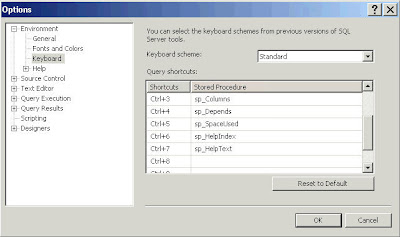
(You can add/change your own Shortcut Commands)
Click OK. You will have to re-start SSMS to use these shortcuts.
Next time if you want to see the size of a table, instead of typing sp_SpaceUsed TableName, simply select the table and press Ctrl+5 and Voila...
A list of Database Engine Stored Procedures can be found here...
Click on Tools Menu.
Select Options Menu
Select Keyboard on the Environment Tree
add the following shortcuts
Ctrl+3 : sp_Columns
Ctrl+4 : sp_Depends
Ctrl+5 : sp_SpaceUsed
Ctrl+6 : sp_HelpIndex
Ctrl+7 : sp_HelpText


(You can add/change your own Shortcut Commands)
Click OK. You will have to re-start SSMS to use these shortcuts.
Next time if you want to see the size of a table, instead of typing sp_SpaceUsed TableName, simply select the table and press Ctrl+5 and Voila...
A list of Database Engine Stored Procedures can be found here...
Subscribe to:
Posts (Atom)